 Ignidra
 The application
A Battlegrounds tracker that keeps combat in context
Ignidra gathers observed information from Hearthstone Battlegrounds Solo and keeps your results on this PC. Core tracking is free and does not require a Hearth account.
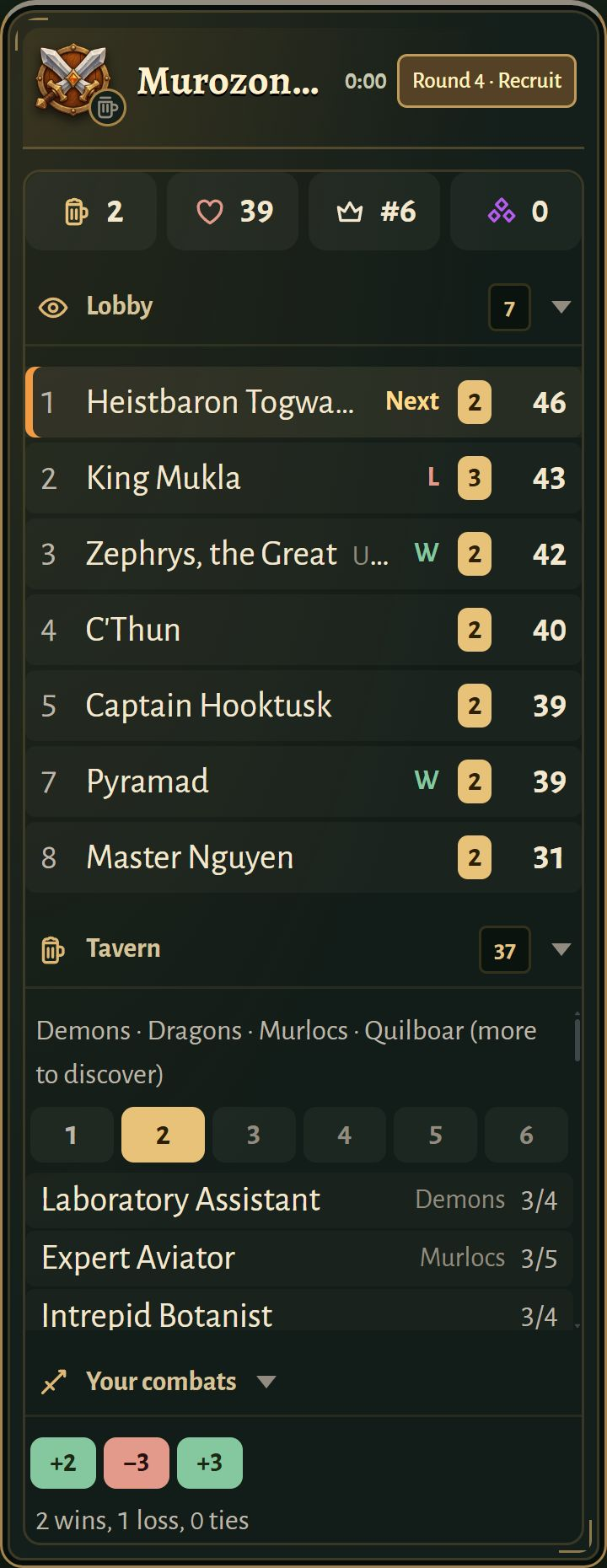
Lobby, tavern tiers and last observed boards
Battlegrounds opponents change from one battle to the next. The tracker keeps information already observed so you can follow the lobby: participants, tavern tiers, last known boards and combat history.
An old board is a reference, not a live view of the opponent’s current warband. Purchases and replacements since your last encounter are unknown.
Set up Battlegrounds tracking on Windows
Install Ignidra
Get the installer from the official download page. The tracker supports 64-bit Windows 10 and 11.
Prepare logging
On Home, check game detection and use “Configure Hearthstone logs” if needed. Restart Hearthstone after a new logging configuration.
Start a Solo game
Run the tracker before the game so it can follow events from the start. A session already in progress may be incomplete.
Review observations
Check the lobby panel and observed battles. If overlays are missing, use the troubleshooting guide before changing several settings.
What combat information means
Ignidra does not show a combat result before Hearthstone reveals it. This guide does not describe a combat simulator or a pre-combat win probability. Missing information remains unknown.
Battlegrounds Duos is not supported: the tracking and history described here cover Solo. For Hearthstone’s separate Arena mode and card selection advice, see the Arena draft guide.
Find your games and prepare the next one
After a game, find your results in local history. They describe your recorded sessions, not a global leaderboard or community statistic.
Local tracking and the Hearth account serve different purposes. Read about data handling and third-party tool limits on the safety page. The installation guide covers settings shared by other modes.
The right guide for your next game
Install the Hearthstone tracker
Windows download, game logs and your first panel settings.
Understand Arena draft advice
Card recognition, synergies and analysis limits. Five complete trial runs.
Find a missing overlay
Check logging, display settings and draft recognition in the right order.
A tracker without Overwolf
Standalone installation, free features and the role of the Hearth account.

Ignidra
Get started with the official release
64-bit Windows 10 or 11. Free core tracking, no account required.